Display Global Reservation History
The reservation history of a guest profile from all the properties under the customer are displayed in the Global tab on the Guest Stay History section of the reservation and guest profiles.
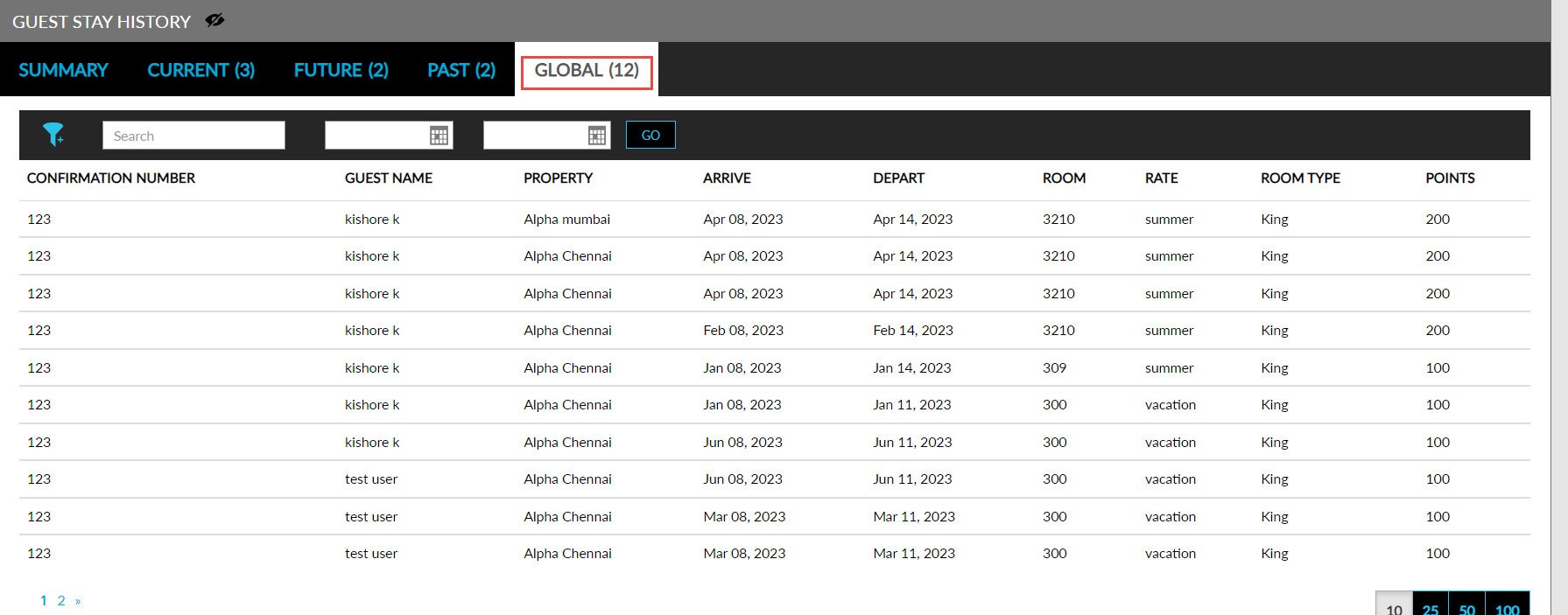
The Column Preferences option displayed in the Global tab in Guest Stay History. Users can select column preferences from this section. The columns are displayed based on the columns selected in the Column Preference drop-down list on the Global Reservation History section. The Column Preference drop-down list displayed on the Global Reservation History section that allows users to choose from the following columns to be displayed on the Global tab:
-
Confirmation Number
-
Guest Name
-
Departure Date
-
Number of Nights
-
Rate Code Name
-
Room Type
-
Room Number
-
Points Earned
When there are no reservations to be shown, the following message is displayed: No global reservations found.
New filters are added to all the four tabs: Current, Future, Past, Global.
Users can select the date range in which the reservations must be retrieved and displayed from the date pickers on the Global tab and click the Go button. The reservations can be filtered based on the properties. Users can search for reservations using the property name or the confirmation ID of the reservations.
Perform the following steps to display the global reservation history:
Enable the Display reservation information from all properties within the tenant checkbox on the Guest Stay History section on the Guest Profile Defaults screen (Settings ➜ All Settings ➜ General ➜ Profile Settings ➜ Guest Stay History) to display the history of reservations created for a guest profile in all the properties under the customer on the Guest Stay History section of the reservation and guest profiles.
Enable the Display Global Reservation History checkbox on the Global Reservation History section of the Guest Profile Defaults screen. When enabled, the Global tab is displayed on the Guest Stay History section of the reservation and guest profiles. This tab displays the reservation history from all the properties under the customer.